
JupiterMoons1.1 - App Store
You'll be able to see results in few seconds.
Publisher Description

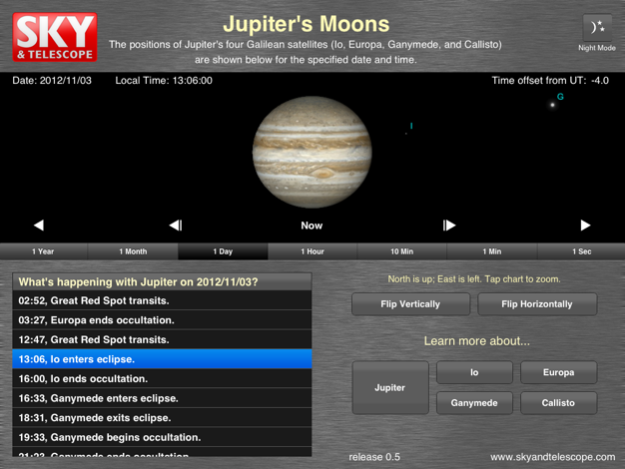
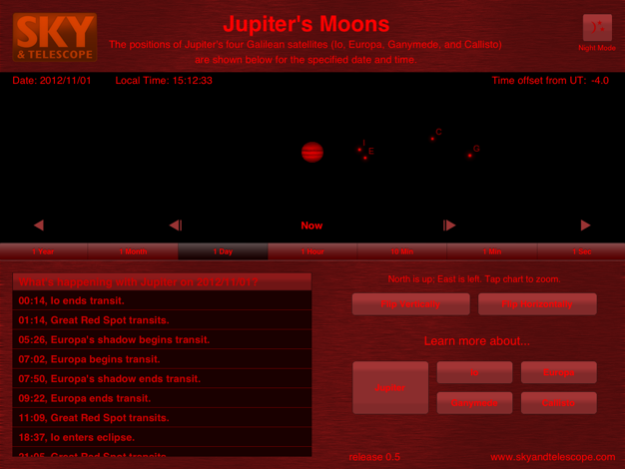

JupiterMoons is your essential guide to observing the king of planets whenever Jupiter reigns over the night sky.
Sky & Telescope’s app helps you locate Jupiter’s four largest moons and time transits of the Great Red Spot with an easy-to-use interface. (The moons’ orbits are shown to scale with respect to Jupiter.) Plus, learn more about what makes these fascinating solar system denizens tick.
Observe Jupiter
• Locate Io, Europa, Ganymede, and Callisto at the specified date and time — unlike in Galileo’s day, they’re clearly labeled.
• Zoom in by tapping on the screen to better watch accurately timed Great Red Spot crossings and moon transits and eclipses. Or zoom out for a full view of the moons’ orbits.
Take Command
• Use the time controls to step through the seconds or hours, or speed through days or even years to see where the moons will be down the line.
• Customize your view to match what you see through your telescope.
Focus on the Details
• Click on any item in JupiterMoons’ complete events calendar to see the action. The calendar lists all the Jupiter-related happenings for the day: moon eclipses and transits, Great Red Spot transits, and moon-shadow transits.
• Learn more about Jupiter and its ice-and-fire moons with our encyclopedic descriptions, accompanied by spectacular images.
Please note: this application is designed to work in landscape orientation only so that you may view Jupiter, the Great Red Spot, and the Galilean satellites at their best.
May 9, 2016
Version 1.1
This app has been updated by Apple to display the Apple Watch app icon.
- Update to Great Red Spot longitude calculation
- Minor bug fix in the "What's happening with Jupiter” events list
- Removed cross hairs around Jupiter
- Updated general design
About JupiterMoons
The company that develops JupiterMoons is Guidebook Inc. The latest version released by its developer is 1.1.
To install JupiterMoons on your iOS device, just click the green Continue To App button above to start the installation process. The app is listed on our website since 2016-05-09 and was downloaded 0 times. We have already checked if the download link is safe, however for your own protection we recommend that you scan the downloaded app with your antivirus. Your antivirus may detect the JupiterMoons as malware if the download link is broken.
How to install JupiterMoons on your iOS device:
- Click on the Continue To App button on our website. This will redirect you to the App Store.
- Once the JupiterMoons is shown in the iTunes listing of your iOS device, you can start its download and installation. Tap on the GET button to the right of the app to start downloading it.
- If you are not logged-in the iOS appstore app, you'll be prompted for your your Apple ID and/or password.
- After JupiterMoons is downloaded, you'll see an INSTALL button to the right. Tap on it to start the actual installation of the iOS app.
- Once installation is finished you can tap on the OPEN button to start it. Its icon will also be added to your device home screen.
Program Details
System requirements
Download information
Pricing
Version History
version 1.1
posted on 2016-05-09
May 9, 2016
Version 1.1
This app has been updated by Apple to display the Apple Watch app icon.
- Update to Great Red Spot longitude calculation
- Minor bug fix in the "What's happening with Jupiter” events list
- Removed cross hairs around Jupiter
- Updated general design
version 1.1
posted on 2016-05-09
May 9, 2016 Version 1.1
This app has been updated by Apple to display the Apple Watch app icon.
- Update to Great Red Spot longitude calculation
- Minor bug fix in the "What's happening with Jupiter” events list
- Removed cross hairs around Jupiter
- Updated general design
version 1.1
posted on 2016-05-09
9 May 2016 Version 1.1
- Update to Great Red Spot longitude calculation
- Minor bug fix in the "What's happening with Jupiter” events list
- Removed cross hairs around Jupiter
- Updated general design
version 1.1
posted on 2016-05-09
May 9, 2016 Version 1.1
- Update to Great Red Spot longitude calculation
- Minor bug fix in the "What's happening with Jupiter” events list
- Removed cross hairs around Jupiter
- Updated general design
version 1.1
posted on 2016-05-09
May 9, 2016 Version 1.1
This app has been updated by Apple to use the latest Apple signing certificate.
- Update to Great Red Spot longitude calculation
- Minor bug fix in the "What's happening with Jupiter” events list
- Removed cross hairs around Jupiter
- Updated general design
version 1.1
posted on 2012-11-15
version 1.1
posted on 1970-01-01
2016年5月9日 Version 1.1
This app has been updated by Apple to use the latest Apple signing certificate.
- Update to Great Red Spot longitude calculation
- Minor bug fix in the "What's happening with Jupiter” events list
- Removed cross hairs around Jupiter
- Updated general design
version 1.1
posted on 1970-01-01
2016年5月9日 Version 1.1
- Update to Great Red Spot longitude calculation
- Minor bug fix in the "What's happening with Jupiter” events list
- Removed cross hairs around Jupiter
- Updated general design
version 1.1
posted on 1970-01-01
9. Mai 2016 Version 1.1
- Update to Great Red Spot longitude calculation
- Minor bug fix in the "What's happening with Jupiter” events list
- Removed cross hairs around Jupiter
- Updated general design
Disclaimer
Official App Store Link
We do not host JupiterMoons on our servers. We did not scan it for viruses, adware, spyware or other type of malware. This app is hosted by Apple and passed their terms and conditions to be listed there. We recommend caution when installing it.
The App Store link for JupiterMoons is provided to you by apps112.com without any warranties, representations or guarantees of any kind, so access it at your own risk.
If you have questions regarding this particular app contact the publisher directly. For questions about the functionalities of apps112.com contact us.
